
• Follow us on Twitter
  • Join our Facebook Group
  • Join me on Google Plus
  • Add me on Linkedin
  • RSS

  • Home
  • Services
  • Tools & Downloads
    • Google Analytics Content Targeting Generator
    • A/B/n Split Test Confidence Calculator with Graphing
    • Simple Feedback Form with Google Analytics Integration
  • About
  • Contact

Blog - Latest News

5 Essential Google Analytics Tips for Bloggers

0 Comments/ in Analytics / by Robert Kingston
April 17, 2010

When starting out with blogging it may be intimidating to use Google Analytics or where to begin. Anyway, here are 5 key tips I recommend focusing on, to write a succesful blog:

1. Setup goals & funnels

Goals will help you to track your progress, against blogging-specific metrics (assuming you want to earn a buck, rank higher or get more exposure)… Here’s how to set them up:

  • Track clicks on your RSS subscribe button
  • Track submissions on your contact form
  • Track comments on your posts

2. Pay attention to referring sites

Look at which sites are sending you traffic – here you may find link partners, guest bloggers and others who you can develop relationships with online. Afterall, it’s not about links so much as it is about building strong relationships online.

If you have setup goals, you may even find certain sources convert better than others.

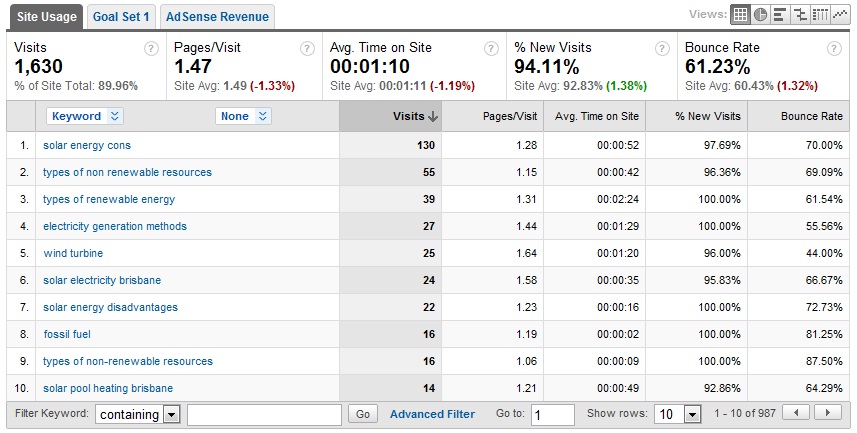
3. Review search terms

If you’re a professional blogger and you’re not aiming to rank for certain keywords, you should. Reviewing your search terms can help you to identify what you’re ranking for and which terms are bringing in converting visitors – this will help you to write follow-up posts that attract even more qualified traffic.
4. Watch best performing posts

Have you written some pillar articles that serve as the main source of traffic to your blog? Watch these posts to determine any changes in traffic – maybe add a targeted call to action at the bottom of these posts to see if you can increase the conversion rate of these pages as landing pages.

5. Setup site search
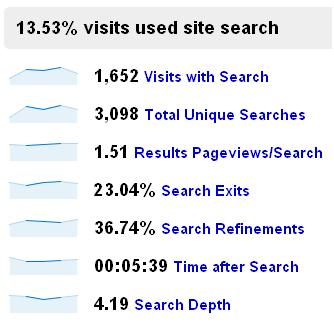
Perhaps the most useful tool in Google Analytics is overlooked, even by many professionals. Site search is KEY for finding gaps that exist in your site’s content. All you need to do to set this up is:

  1. Run a search on your blog and get the URL:
  2. Take the word “search” (or whatever your blog has, there – mine uses “q”) out of the URL
  3. Login to your Analytics account
  4. Select “Edit” next to your profile
  5. Click “Edit”, next to “Main Website Profile Information”
  6. Choose “Do Track Site Search”
  7. Enter your Query parameter – in this case “search”
  8. Save – you will see site search data in the Content section of Google Analytics, within 24 hours.

There you have it. That’s my little quick-start guide to using Google Analytics, properly on your blog.

← Track RSS Subscribers on Your Blog with Google Analytics Goals
Track WordPress Blog Comments in Google Analytics →
Comments

Leave a Reply

Want to join the discussion?
Feel free to contribute!

Leave a Reply Cancel reply

Your email address will not be published. Required fields are marked *

You may use these HTML tags and attributes: <a href="" title=""> <abbr title=""> <acronym title=""> <b> <blockquote cite=""> <cite> <code> <del datetime=""> <em> <i> <q cite=""> <strike> <strong>

About Rob

I'm an ex-Hitwise Analyst turned freelancer that helps clients turn their analytics data into better converting websites. I also like to run, drink, eat and be merry. My girlfriend, on the other hand, would say I play too many computer games and use my Androids too much (yeah, right :P).

Subscribe For More Great Tips


Subscribe by RSS


Follow me on Twitter


Follow Optimisation Beacon on Google+

Categories

  • Analytics
  • Conversion Rate Optimisation
  • Marketing & Consumer Insight
  • News
  • Testing

Most Popular Posts

  • Google Analytics’ New Site Speed Report Tracks Page Load Times
  • Track WordPress Blog Comments in Google Analytics
  • Build a Conversion Rate Heatmap by Hour & Day of Week in Google Docs
  • Track Page Load Times with Google Analytics’ Asynchronous Script
  • See Google Website Optimizer (MVT) Tests in Google Analytics

Recent Posts

  • Web Browsers Most Susceptible to Browser Fingerprinting
  • Cohorts.js: Open Source JavaScript MVT Split Testing Framework
  • 10 Sources of Direct Traffic & How To Track Direct Shares
  • Track What Visitors Copy From Your Site in Google Analytics
  • Track How Far Your Users Scroll in Google Analytics

Blogroll

  • Analytics Ninja
  • Justin Koro
  • LunaMetrics Blog
  • Marketing Experiments
  • SnowPlow Analytics
  • Teacup Marketing
  • Visitor Centric CRO Community
  • Home
  • Services
  • Tools & Downloads
    • Google Analytics Content Targeting Generator
    • A/B/n Split Test Confidence Calculator with Graphing
    • Simple Feedback Form with Google Analytics Integration
  • About
  • Contact
415Follower294Subscribers
© Copyright - Optimisation Beacon - Wordpress Theme by Kriesi.at