
Ethnio Review: How I Used it to Interview My Visitors
Web analytics tools often only give you a limited understanding of your visitors. So when I recently ran a trial of Ethnio on my site to recruit people like you to interview, I was amazed with how much insight I gained.
What is Ethnio?
 It’s a service that uses your website to recruit users for research purposes. Decide which visitors you want to target, prompt your users to participate in research for an incentive, screen out the ones you don’t want… and boom. You’ll be recruiting quality participants in next to no time.
Following is how I used it recently on Optimisation Beacon to conduct interviews. Read on for how I used Ethnio (and its features) in excruciating detail ;)…
1. The Opportunity & Objectives
I knew very little about my website visitors and was concerned that whatever I was going to write about was going to alienate some of my readers. I had little understanding about what kept bringing loyal visitors back to my site (outside of top landing pages for return visitors) and I wanted to learn what new visitors thought of my site. On top of that I really wanted to know what people found useful, struggles they face in their jobs and what would encourage them to subscribe and share my content.
2. The Methodology
With little knowledge of my visitors, I opted for exploratory research involving simple unstructured interviews with my website visitors. Sure, I could try to go out and contact subscribers, or write a blog post about it, but I would only reach already-loyal subscribers, so I chose to recruit via my website.
My budget for the study was a mere shoestring (90% the costs I incurred went straight to the respondents and the rest were overseas phone call charges - note to self, “Do not call Israel.“) so choosing Ethnio’s free package was a no-brainer for me.
3. Setup
The simplicity of Ethnio cannot be understated - it was dead simple. Right from the get go, I was able to create a custom screener that would allow me to phone up and interview loyal readers and new visitors. Here’s how easy it was:
Choose the design of your screener modal dialoge
When you create a new screener, you can jump in and select the screener type. Choose from pop-over modal dialogues to a little message that sits in the bottom corner of the users’ screens.

Select the screener design you want Ethnio to use.
Specify where you’re recruiting from and for how many respondents
Simply pop the URL in here that you’d like to preview your screener on and let Ethnio know how many respondents you need for your study.
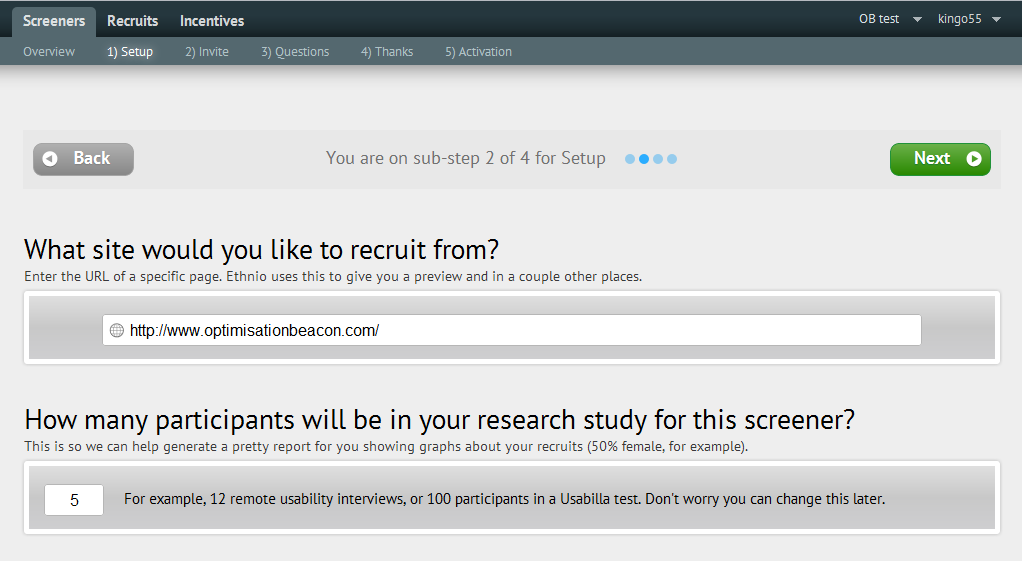
Specify where you're recruiting participants from and how many you need.
Add your company logo
Customise your screener with your company’s logo, so visitors know the research is being conducted for your site.
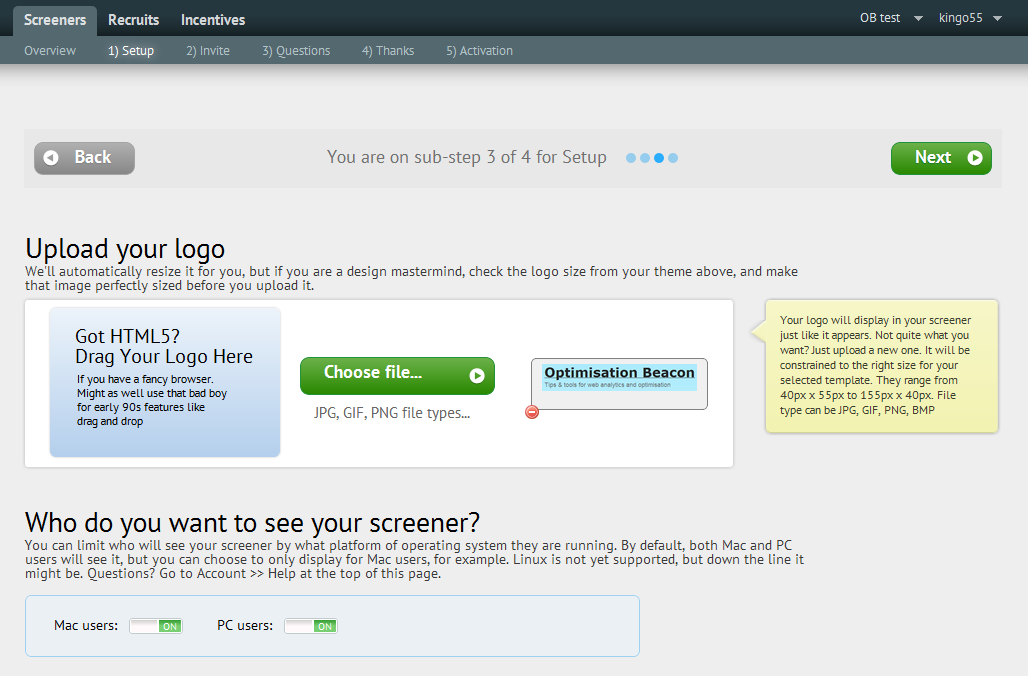
Add your logo to the screener form.
Position the screener on your site so it pops up where you want it to
Ensure the screener pops up where you want it to and make sure it’s not covering anything up, that you don’t want it to.
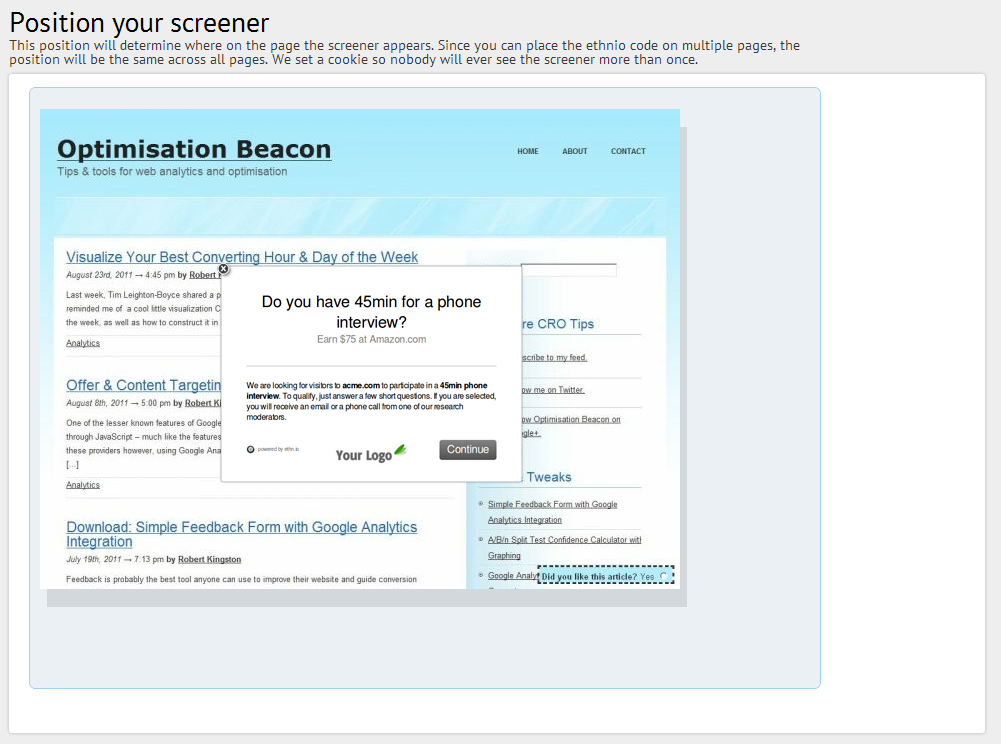
Position the Ethnio screener to sit on the page.
Customise your screener text and set the incentive
Here’s your chance to set the incentive and customise your screener’s text. This part is particularly important. You have two options here: offer a universally valuable incentive (e.g. cash) or give away something cheaper albeit with niche appeal (e.g. download an eBook). I think it’s important to give an incentive of universal appeal, as this will ensure your study appeals to everyone whilst your screener weeds out the people you don’t want.
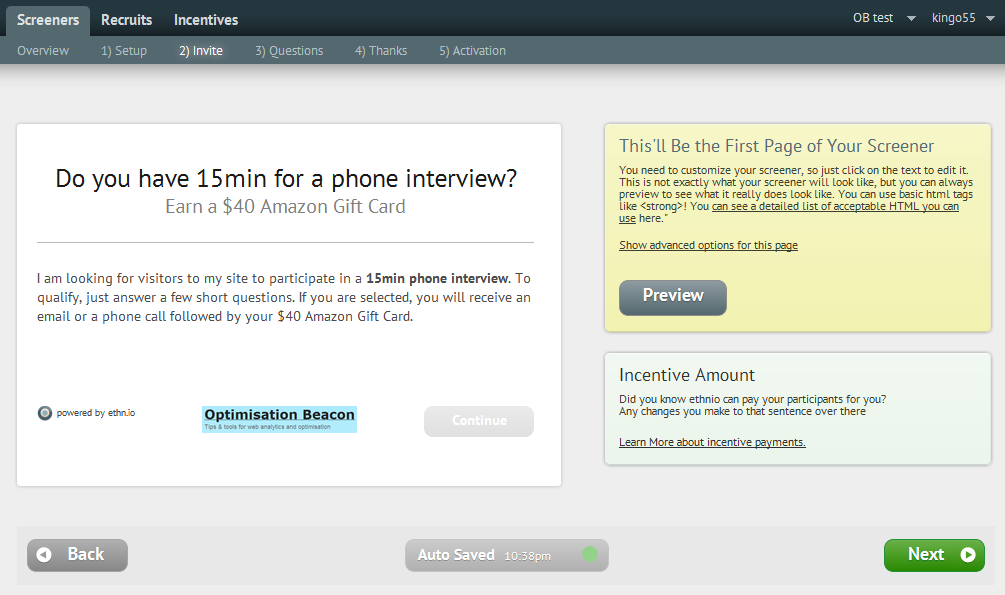
Set the text and incentive to be shown in the screener dialogue.
Create the screener questions
Perhaps I asked a few too many questions here (you can’t blame me for being curious, can you?). This allowed me to learn more about my respondents and be picky with who I chose to interview.
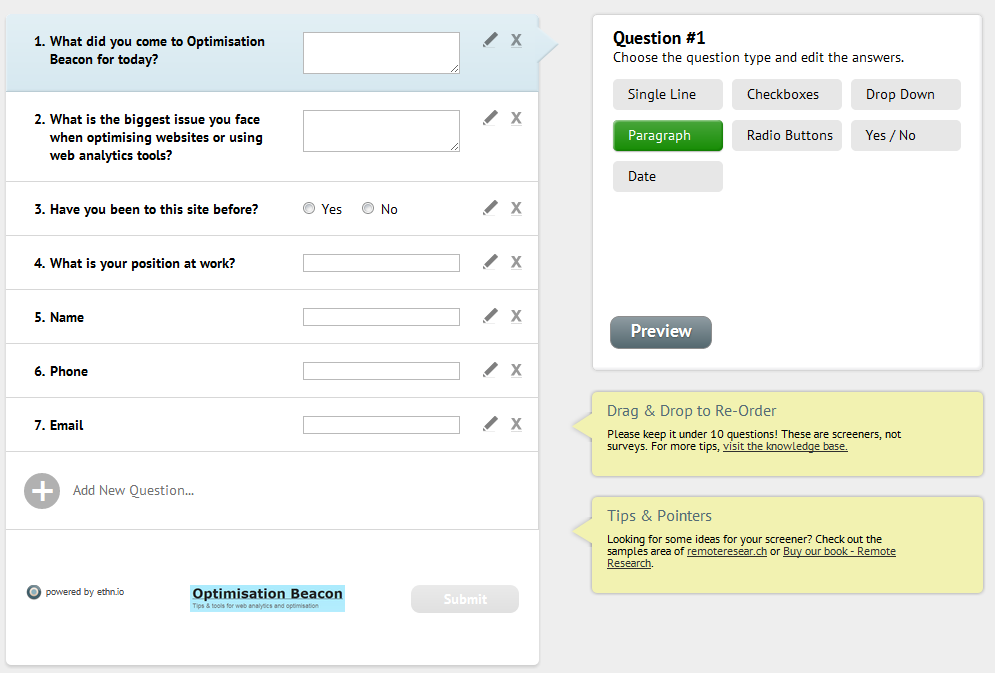
Provide questions to screen out users you don't want to have participating in your research.
Customise your thank you message
A little thank you page to show visitors once they’ve completed your screener.
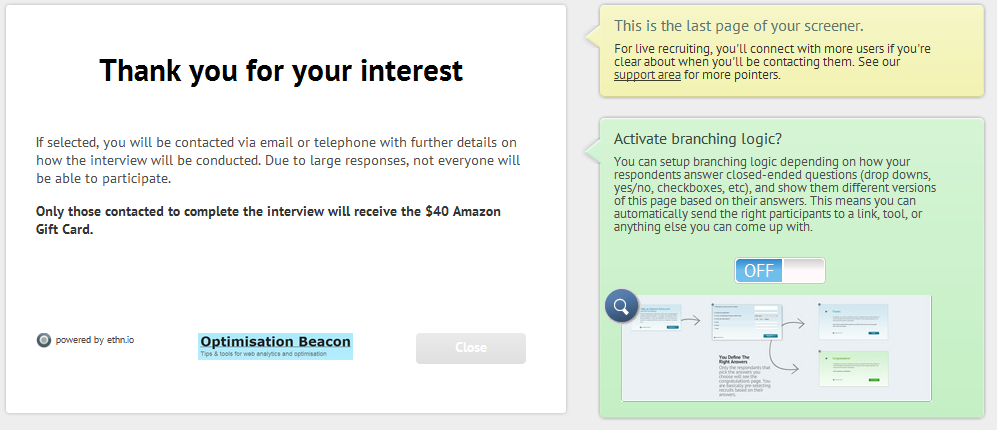
Customise the text at the end of your screener.
Optional: Automatically recruit users and pass them to your online study
By default, Ethnio will recruit people and wait for you to screen them in, when you login to the interface. Branching logic allows you to automatically screen in respondents based on their answers.
I didn’t use the branching logic in this project, but if you’re recruiting for usability testing or online surveys for example, you can link screened respondents directly into the study, so you get your data as fast as possible.

Publish your screener via your site, Twitter or a public link
Once you’re done, Ethnio allows you to share your screener with a link provided or setup the screener to show on your site. I can see this being popular with any businesses who have massive social media presences.
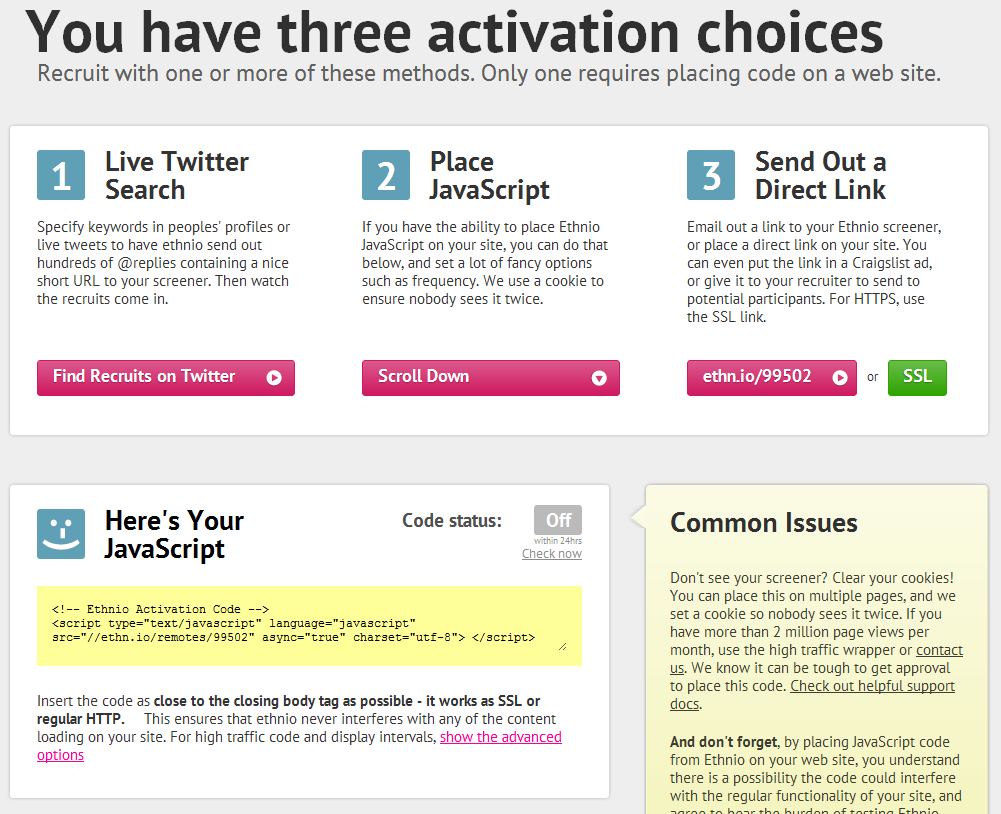
You can share the screener through your site or tweet it out to your social media profiles.
4. Data collection
After just over a month, and a poor response rate to my $40 Amazon gift voucher incentive, I had a number of candidates which I could choose to interview over the phone. Obviously in the below instance, I hid the responses, so you can’t see my visitors’ phone numbers…
Here you can collect and manage your respondents in an easy to use interface.
The interviews
All I had to do was setup a time in which the interviewee and I could sit down for a quick chat and call them up. In this regard I was a little under-prepared. I basically called up with a rough set of questions and let the respondents tell me a bit about themselves. The calls were recorded for my future reference, all the while I took notes.
5. What I learned
The main points I learned from the interviews were as follows:
- Visitors to Optimisation Beacon sit roughly within one of two segments: Developers or Analysts
- Whilst analysts may not necessarily have the technical know-how, developers struggle with the marketing/business application know-how (though some have the best of both worlds)
- Analysts are drawn more toward posts that help them do their jobs and get more insight (i.e. How to maximise the insight they get from GA, calculate split test significance, and posts like this one)
- Developers are generally more interested in the codes and how to posts that will enable them to affect business outcomes (i.e. Track GWO tests in Google Analytics, setup content targeting with custom variables etc…)
- The tools I have developed encourage visitors to come back to the site on a regular basis (particularly the split test calculator)
- Developers, whilst being more interested in code are also interested in learning about website optimisation, but more introductory-level posts whereas analysts are looking for more advanced posts
6. Actions
Obviously, it’s great to learn lots of interesting stuff, but it’s even better if you can do something about it. Here’s what I’m working on now and for the future for Optimisation Beacon:
- Post meatier, authoritative articles/resources that help (and engage) analysts and web developers do their jobs
- Develop more conversion and maths related tools
- Post more consistently (OK, perhaps I failed a bit there) and develop my instinct on what my readers will respond to best
The Verdict: 9/10
Pros
- It’s freemium! And because of this, I’m now a paying user at work.
- Setup is lightning fast and beyond easy.
- They’ve covered just about everything with the service, including incentives, full customisation of the text and screener questions.
- The interface is sleek and quirky, without getting in your way of setting up your screener or recruiting respondents.
- Use Ethnio to pay incentives to users (for a 15% cut)
Cons
- The screeners’ branching logic is a little inflexible as you can’t send different respondents into different studies based on their answers.
- If you go premium, the cost is a little on the high side. If it were slightly lower, I could see this tool as being one of our permanent tools. Perhaps in the future they may provide discounted annual accounts or agency deals.
- Doesn’t show you abandonment metrics for the screener (say if you ask some really personal stuff - occupation, name, email, phone etc - you want to know if it’s affecting the response rate)
OK, so you know I love this tool but should you use it? Well, if you’ve never had personal contact with your customers (or your clients’ customers) and want to understand them, I highly recommend you check out Ethnio to recruit for interviews. If you’re looking to recruit for another remote study (e.g. usability testing), I can’t quite say, as I haven’t used it for that purpose yet.
Let me know your thoughts about Ethnio in the comments…


Thanks for posting such a detailed walkthrough. I’ve been teetering on trying ethnio and this was very insightful.
Thanks. I’m glad you found it useful, Christine.