
10 Sources of Direct Traffic & How To Track Direct Shares
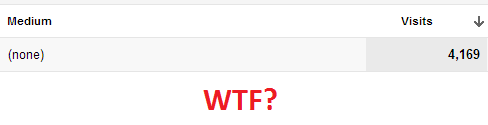
Whenever people attempt to explain the meaning of direct visits, I always feel like it’s misleading or incomplete in some shape or form. You were probably told:
“Oh, it’s those people who type in your domain name. Yeah that’s it.”
Or:
“Umm… they’re the people who bookmarked your website.”
Sure they’re two possible sources of direct visits but as I’ll explore in this article, they aren’t always. This is kind of a shame because direct traffic usually has a strong intent which you’ll see in terms of behaviour and conversions. Unfortunately most people just don’t know the definition of a direct visit in GA.
The true definition of a direct visit is any visit that lands on your site without a referrer. A direct visits will not override an existing campaign (search, referral or others).
Therefore, Direct is not always Direct in GA or Site Catalyst
Even if someone visits your site directly, they’re not always going to count as a direct visit. Confused? You should be (it confused the bejesus out of me when I first encountered this). Take this situation for example:
Johnny visits your site through an AdWords campaign and returns a week later directly through a bookmark (aka. while the _utmz cookie still exists). In this case, both visits will be attributed to AdWords.
That’s why 3-month-old AdWords campaigns still refer you traffic, long after you’ve paused them.
Anyway, here are a few different sources which you may not have considered. Is this list exhaustive, Rob? Nope… but it covers most bases.
1. Type-in Traffic
These are usually your existing customers, loyal readers or people that simply heard about you through some offline channel.
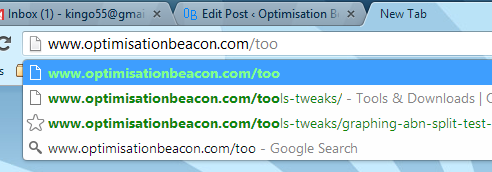
2. Links sent through instant messaging
Whether it’s SMS, Whats App, MSN Messenger, AIM, Yahoo Messenger, Skype, Kakao Talk or Google Talk - all of these instant messaging programs will not provide a referrer, and show up as direct. The exception to this is web-based chats which are not done over HTTPS or running through Java/Flash/Silverlight etc.
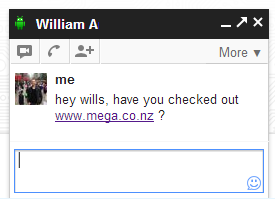
Even web-based chats appear to send direct visits (at least under HTTPS)
3. Un-tagged emails (Outlook, desktop clients and secure web-based email)
Whether your visitors are sharing links with their buddies or you send out an email without any URL tagging on it, visitors coming from secure web mail or desktop email clients (Outlook or Thunderbird) will also show as direct visits. Fortunately, quite a number of people don’t enable HTTPS for their web-email clients, so you may see GMail, Yahoo Mail and Hotmail showing up under your referrers section.
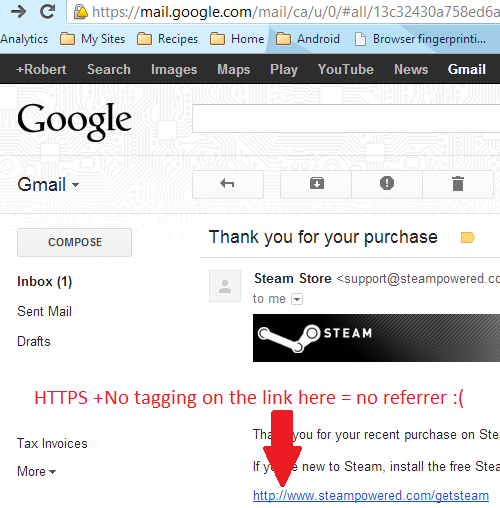
This traffic can show as direct - especially when untagged emails are sent
4. Opening a link in “Incognito Mode”, “In-Private” or similar
Potentially a big source for those… ahem… dubious websites, could be “Open link in (incognito|In Private) window” - of course visitors . If you were to open a link in a new tab or in a regular new window, however, the referrer will still be passed (at least under Google Chrome).
This is potentially a bigger issue for sites with dubious content within the site - think “18+ sections.”
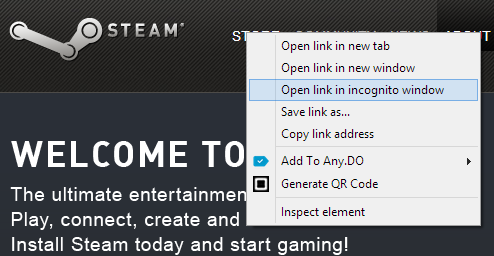
Opening in a new window will provide a referrer, but not opening in incognito mode
5. Bookmarks
Typically if you’ve bookmarked a site, chances are you’ve been there before. This means that if your previous campaign is still available in your cookies, this won’t result in a direct visit. If it’s been 6 months since you last visited the site, you’ve cleared your cookies or you’ve imported your bookmarks from another browser, you will certainly show as a direct visit.
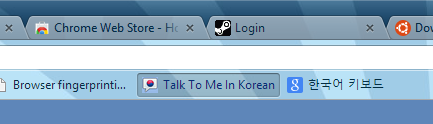
Opening bookmarks do not provide a referrer - and therefore can lead to direct traffic
6. Use of rel=”noreferrer” in the previous link
The HTML5 specification includes rel=”noreferrer” which basically means that anyone following a link with this attribute and value will land on the following URL without a referrer. Don’t expect this to be a huge source of direct traffic, however.

Coming in HTML5, rel=”noreferrer” will also be a source of direct visits (arguably very few though)
7. Visitors from HTTPS websites
Part of the HTTP specification recommends that browsers do not pass along a referrer to non-HTTPS sites. The wording of this is slightly vague, as it reads, “should not” rather than, “must not”. This is certainly an odd point as it sometimes does provide a referrer.
For instance, searching from SSL Google.com will result in a referrer on the URL you land on. So this isn’t a hard and fast rule, but it’s generally the case.
8. Links within mobile and desktop apps
Lastly, if you’re still scratching your head about a huge number of direct visits, could they be arriving through links within your mobile/desktop application?
EDIT: A note about iOS6 and other mobile operating systems, thanks to Alistair Lattimore in the comments section below. Many apps use the Safari browser and links will therefore pass a referrer to your site. Analytics distinguishes this traffic under the browser “Safari (in-app)”. This is also the case with other devices, however I’m unsure how in-app browsers show up in GA though.
9. Browser homepage set to your website
If you’ve got a large enough company that sets its browser homepages to default to your website, then this will surely influence your direct visits as well.
10. Hacks/extensions to hide referrers
A very small number of visitors will intentionally hide their referrers using extensions like this one for Chrome and others for Firefox.
Also, some browsers will not carry a referrer from some JavaScript initiated links.
A (very) subjective guess on the liklihood of direct sources
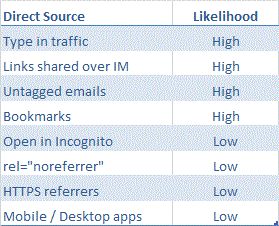
This is just my subjective view on how likely you are to receive visits from particular direct traffic sources.
As good as direct traffic is, if you’re not tagging all of your campaigns, it’s going to be polluted. At least now you can.
“…but Rooooob. I really want to track direct shares.”
You can! Well, kind of…
If you’re familiar with the concept of dark social (that is links shared through email, instant messaging and whatnot which would otherwise show up in your GA as direct), then you can kind of track this. In the case of The Atlantic’s article, dark social accounts for a large majority of social on the web.
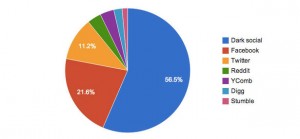
That big blue chunk isn’t Facebook - that’s dark social traffic to The Atlantic.
It’s important to track right?
Well, yes. And it can be surprisingly simple to do. Here are two ways:
Tracking direct shares of URLs using advanced segments
Realistically, you’re not going to type in a long link such as “http://www.optimisationbeacon.com/analytics/using-brower-fingerprinting-in-google-analytics/” directly into your browser. Therefore, you can assume that anyone landing on a page other than your homepage is coming through dark social. Here’s an advanced segment I cooked up earlier:
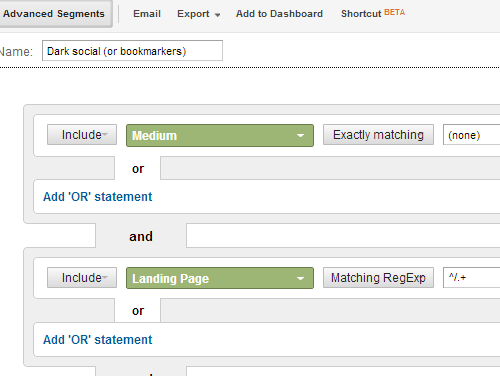
Download here: Dark social (or bookmarkers)
It can help you answer valuable questions such as, “Which content of mine is being shared most?”, “Which content is getting bookmarked by visitors?”:
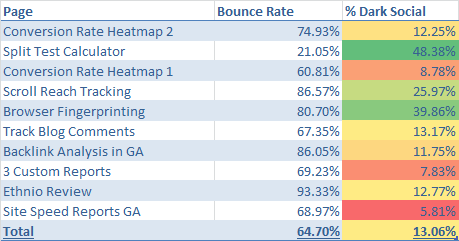
After conducting an analysis of dark social traffic, I now know which of my posts are drawing bookmarkers and direct shares.
Tracking direct shares of your URL using code (caution: experimental/pseudo code)
According to Richard Fergie, you can track copy/paste shares on the web very simply:
<script>
function addTrackingParameters() {
    if (history.pushState) { //feature detection
        var currentURL = window.location.href;
        var trackingParams = '?utm_src=ctrl-c+share&utm_medium=direct';
        var newURL = currentURL + trackingParams;
        window.history.pushState(null, document.title, newURL);
    }
}
</script>
This works by adding URL tagging to the end of the link after the page has loaded. When a visitor copies the link, the URL tagging will go along with it, carrying “ctrl-c share”.
…and Bob’s your uncle - you’d probably be tracking direct shares of your URLs in GA. Beware, as I haven’t tried this yet. Let me know in the comments if you get around to trying this one out. I would love to get in touch with you.


thanks Rob, this makes sense. There is light at the end of tunnel after all. I’m going to give the code a whirl now.
Cheers, Phil. Good luck with that code and heed the warnings above.
Certainly not ready for a production environment!
And please share your findings when you have a chance.
Rob,
Two additional points to consider among your list as well:
Apple iOS6
Apple released iOS6 on 19 September 2012 and with update, Safari began using Google secure search by default. For those unaware, Google secure search uses HTTPS and part of the specification states that no HTTP referrer data is transmitted from secure to insecure connections. The result of this update is that large percentages of Google organic search traffic from iOS6 will to be reported as direct.
Apple iOS Safari
You can get an insight into how often your website is getting loaded within an iOS application by checking the browser that is in use. Around August 22 2012, embedded versions of Safari report their browser string or user agent string as “Safari (in-app)”. I haven’t noticed a similar user agent for Android operating systems yet, so it isn’t possible to understand the split/ratio for that currently.
Al.
Thanks Al. Very good points - Safari (In-App), I didn’t even consider that!
As for SSL searches, that’s an interesting one, because it looks like Google does pass a referrer along despite the HTTP spec recommending otherwise. Try it out for yourself - you should see “https://www.google.com.au/” in document.referrer. The thing is, the spec doesn’t say it MUST not send a referrer, just that it SHOULD not.
Still, who knows what Safari does when it has a referrer from an HTTPS to a HTTP site. Will have to look into this one. Unless you can confirm otherwise.
Robert great post I tried running the script but I was unsuccessful if you figure out how to get it to run I’ll happy to hear a bout it.
Thanks again, Menachem. As I mentioned above, it’s really only pseudo code, so it’s not going to work. If I get around to testing and developing something, I’ll certainly post about it.