
Conversion Optimisation for ‘Noobs’: Choosing What to Test
I see a lot of people who start off in conversion optimisation making several critical mistakes when choosing what to test.
Here are a few that I see frequently:
- Testing content or elements that are meaningless to customers
- Making small changes and expecting the world
- Running a test in a low trafficked part of the site
- Testing parts of the site that already work well before solving huge problems in the funnel
- Testing aimlessly around the site
- Testing without a clear objective
These are all big mistakes but at least they’re testing. While it’s good they’ll learn and develop their own methods, I think these few rules will help shorten the learning curve and fast track you to getting strong and meaningful results. Here they are:
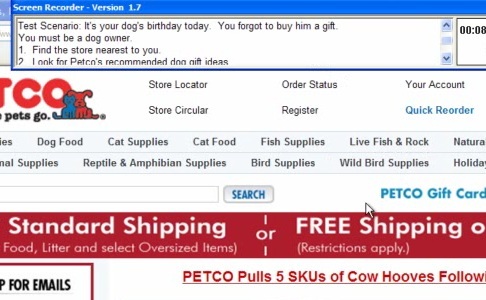
1. Conduct some small usability sessions
Sign up at User Testing, set some scenarios and find out what people struggle with. Can they find something they like on your site? Can they complete a transaction? Are they missing key decision making information on the site?
These questions will help give you a high level overview of where problems lie on your site. When you know where people are struggling, you can begin to develop solutions to these problems and hopefully position yourself to convert at a higher rate.
2. Identify the page with the highest abandonment rate to test
If your shopping cart page has an unusually high abandonment rate, then that typically means there is opportunity to improve this step. Making improvements to this page first will surely result in a better conversion rate faster than pages with a low abandonment rate will.
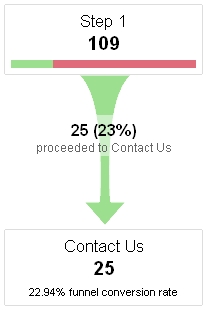
Here you'd test the enquiry form (but you may need more traffic than that!).
3. Interview customers or sales people to find out what customers want
Sure you may think you know what customers want but have you ever asked them or asked your sales people? Usually they’ll tell you what you already know. But sometimes you’ll get little nuggets of gold that you can use to inform your tests. Furthermore, once you’ve talked to a few, you’ll get an idea of how important certain elements are to customers.
If you’re ever put into the position of - “Hmm I thought customers wanted X, but they’re telling me they want Y more” - Test it because it’s a brilliant test to run - especially for lead gen sites.
4. Keep check on your competition and strong players in other markets
Say you’re having trouble designing a shopping cart page for your site and your problem is specific to your industry. Check out what your competitors (or even better those operating in another market) are doing and hopefully you’ll get some ideas to test that apply to your site.
For instance, you might find that ecommerce sites that have items with a high average order value will push you more feverishly into the cart and checkout whereas ecommerce sites with low average order values will try to keep you browsing longer and entice you to buy more.
5. Calculate how long it will take to run a test
Chances are that you don’t want a test to run over 30 days. Not only does it impact the statistical validity of your results but the test is going to waste valuable time.
Google Website Optimizer has built a great little calculator to help you estimate how long it will take to run. I use this for every test that I setup.

6. Don’t be afraid to test unconventional solutions
Sometimes going against the grain can pay off big time. For instance customer reviews can be risky but at the same time, they can have profound results on conversion rates - as customers use these to make decisions.
You might like to try these counterintuitive ideas:
- Allowing product reviews
- Google for inspiration (“ecommerce conversion tips”, “landing page conversion tips”, “jakob nielson” etc)
- Provide a ridiculous offer
- Remove required fields
- Make your offers blend in with your site design rather than stand out
- Provide candid reviews (the good, the bad and the ugly - to a point)
- Show very detailed images - even if it means product flaws may be exposed
- Writing without marketese language - using plain, objective and concise copy
- Removing testimonials and other trust symbols where unnecessary
- Removing options from users
- There are many more too
Of course these crazy ideas aren’t going to work for every site, but they will work in some instances.
7. Approach testing with strategy
Last but not least, I think people don’t consider conversion optimisation to have any strategy to it. That’s rubbish. Strategy should drive your conversion optimisation efforts. Here’s a little process I bring to the table:
- Get clear about the objective(s) and set a goal (i.e. 30% Increase)
- Research & find potential issues on the site from the full funnel (traffic sources down to your ultimate goal)
- Plan ahead and prioritize areas that are:
- The biggest problems/changes
- Easiest to optimise
- Least risky to experiment with
Anyway those are my two cents about choosing what to test. Hopefully that helps. Let me know your thoughts in the comments.
Credit: Stuart McKeown for the title…


Rob - This article is spot-on when in comes to getting started in conversion optimization (I’ll spell it with a ‘z’ since I’m in the US
The key to a winning CRO strategy is using a bottom-up approach just as you’ve described. For example, if you want to optimize an ecommerce site, then optimize the shopping cart first, then work your way to product pages then to the home page. If you start from the other direction, it will be hard to see what changes really have a positive effect on the funnel.
Thanks, Todd - I’m really glad you found it spot on!
In general, I think a bottom up approach is best, but if you can’t test anything worthwhile deep in the funnel, it’s not a bad idea to test something more pressing higher up. Sometimes a bad homepage can be a good place to start if the bounce rate is unusually high. It all depends on where you can see some room for significant gains IMO.