
4 Valuable Insights from Tracking Page Load Times in Google Analytics
I’ve been tracking page load times on my blog for quite some time now. So it’s about time that I published my findings with my setup (now that I have enough data and all). I’ve dug up the key insights for my site after looking at some reports unfortunately I still don’t have enough data to make certain observations (increasing subscriptions, comments, Twitter clickers etc) so I stuck to pages per visit as my engagement metric.
Let’s investigate…
1. Does speed matter?
Well duh! Here’s proof - visitors that experienced a “Very fast page load” (that is, the page is loaded in less than 1 second after the DOM onload event fires) viewed more than double the amount of pages per visit than those who experienced Slow or Very Slow loading pages (over 10 seconds to load):
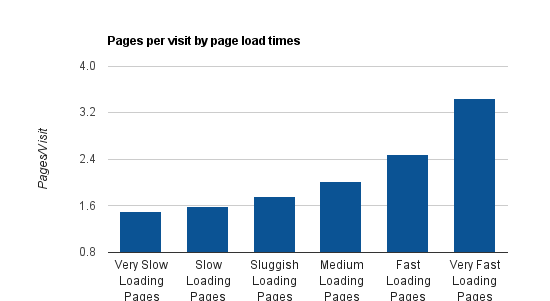
Visits with fast page load times have a strong correlation with more pages viewed per visit.
One key factor that influences the results of this however is browser caching. Basically, visits who view multiple pages are more likely to experience a very fast page load time due to browser caching - making them more likely to fit in the model. Regardless, the data is still compelling and anyone who is unconvinced about the importance of page load times in impacting business metrics needn’t read far.
Insight: Keeping page load times to a minimum is an imperative for improving engagement metrics.
2. Page load times by continent
My key markets are the US and Europe (sorry Australia - not much interest down under for CRO/Analytics… yet). My VPS is hosted on the west coast of the US, so it comes as no surprise that Europe’s page load times are sub-par. Asia came as quite a shock and Africa… well - that wasn’t a shock at all. Luckily I’m not targeting those markets specifically.
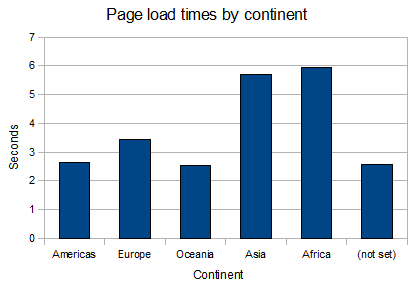
Shorter is better in this case.
Insight: Moving my server to the East Coast of the US should improve load times for my European friends.
3. Page load times by hour of day
My VPS is pretty efficient (at least I’d like to think so) - it runs WordPress with Supercache on top of Nginx and php-fast-cgi withe Cent OS running the show. I have 512mb of RAM to play with and my site doesn’t get hit enough for traffic to impact page load times very much. Server load remains constant throughout the day. However, in the graph below you’ll notice ~1.5 seconds of variance around page load times throughout the day. When matched up with business hours of my key markets, it makes sense that it’s likely not by chance.
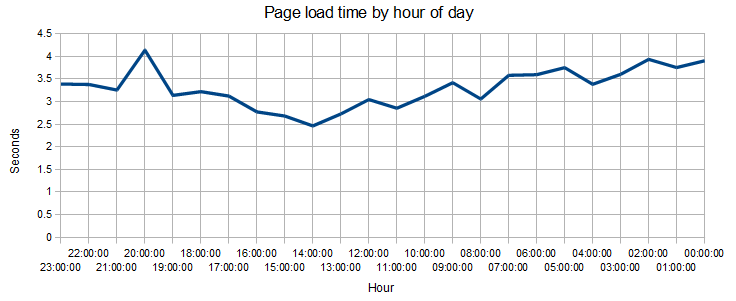
23:00-17:00 Europe/US wakes up, 17:00-09:00 Australian business hours, 09:00-00:00 USA/Europe shutting down for the day (Based on GMT+10 - AEST).
Apologies that it’s reversed (couldn’t work out how to make it go the right way around - I may fix this up if I can find the time or if there’s interest).
Insight: Internet traffic may affect my page load times (or the markets visiting my site at those particular times of the day are impacting load times - I could isolate this but I need more data).
4. Which are my slowest pages?
Many of my posts include graphs and images to help illustrate my points (like this one). Here are some of the worst culprits (I excluded pages with too small a sample):
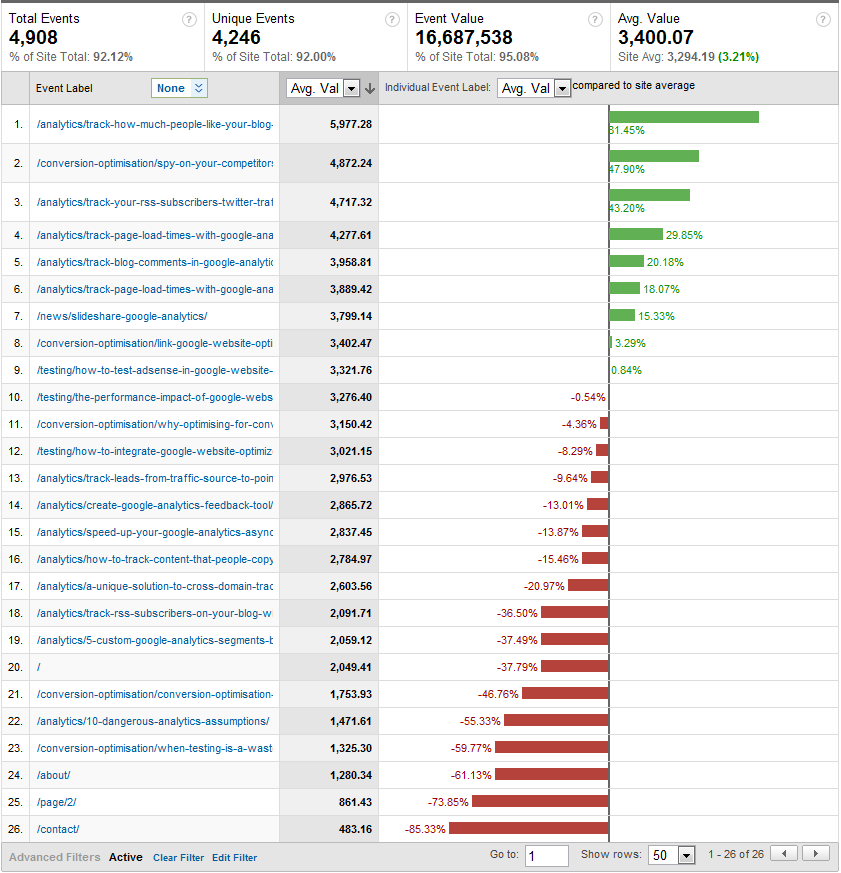
Pages with the highest average page load time (in milliseconds) are what I need to remove.
Insight: Tighten up the slow/popular pages to improve page speed for more of my visitors. The bottom pages are less likely to be landing pages, so browser caching is doing a tremendous job at improving page speed on these pages.
Should you measure page load times?
You can if you want to (read my post on tracking page load times in Google Analytics), but I don’t think it’s that worthwhile. All you need to know is how important page load times are (i.e. for every additional 100ms of load time added, Amazon’s revenue decreases by 1% - this is true!). Just keep a few points in mind:
- Make sure your top landing pages are well optimised
- Make sure your server is close to the markets you serve (or at least use a CDN to get your static resources closer)
- Go and download Yslow and Google Page Speed for Firefox or Chrome’s Speed Tracer to understand how to improve your site
- Measure your site using www.WebpageTest.org
If you’re interested, let me know if you’re interested in how I measure this and the segments/reports I used to extract accurate data.


Those results are incredible. It really helps drill home the importance of page load times to Google Analytics. Count me as a new subscriber Rob.
Thanks Daniel - Glad you liked it!